I Got Phished Last Year. Here’s Everything I Wish I Had Known Before It Happened
Let me be honest with you upfront — I work in tech. I’ve set up firewalls, configured two-factor authentication for my whole family, and read more security blogs than I’d like to admit. And I still fell for it.
A Tuesday morning last March. I was rushing between meetings, half a cup of chai in my hand, phone buzzing. An email from what looked like my bank — clean logo, familiar colours, even my name spelled right — asking me to verify a suspicious login attempt. I clicked. I entered my details. I moved on with my day.
By Thursday, someone had tried to transfer money out of my account. The bank caught it in time, thankfully. But the sheer embarrassment of telling my wife — who has never worked a day in IT — what happened? That stayed with me a lot longer than the incident itself.
I’m writing this because the standard cyber awareness advice you find online is almost always written like a compliance checklist. “Don’t click suspicious links.” “Use strong passwords.” Yes, fine. But nobody explains why smart, careful people still get caught. That’s what I want to talk about.
Why Phishing Works on Careful People (Not Just Careless Ones)
Phishing attacks don’t succeed because people are stupid. They succeed because they’re timed and designed specifically to exploit the moments when our guard is naturally down. That morning in March, I was distracted, slightly stressed, and had already dealt with a real security alert from a different service the week before. My brain was primed to treat this one as normal.
Researchers at Stanford and Google have consistently found that context manipulation — not just email design — is what separates successful phishing from failed attempts. The attacker doesn’t just forge a logo; they create an emotional state. Urgency. Fear. Familiarity. They know that once those emotions are triggered, we make decisions faster and check less carefully.
The email that got me used three tactics I only noticed in hindsight:
- My actual first name — not “Dear Customer”
- A specific-sounding location: “Login attempt from Bengaluru, Karnataka”
- A 15-minute countdown timer in the email body to create pressure
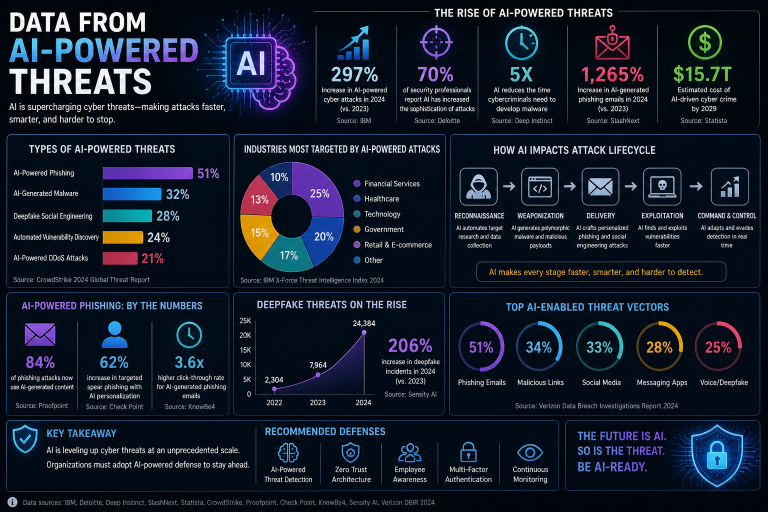
None of that requires technical skill to create. Any half-decent attacker can scrape your name from LinkedIn, pick a city name at random, and add a fake countdown with basic HTML. What takes skill is sending it at the right moment — and they’re increasingly good at that.
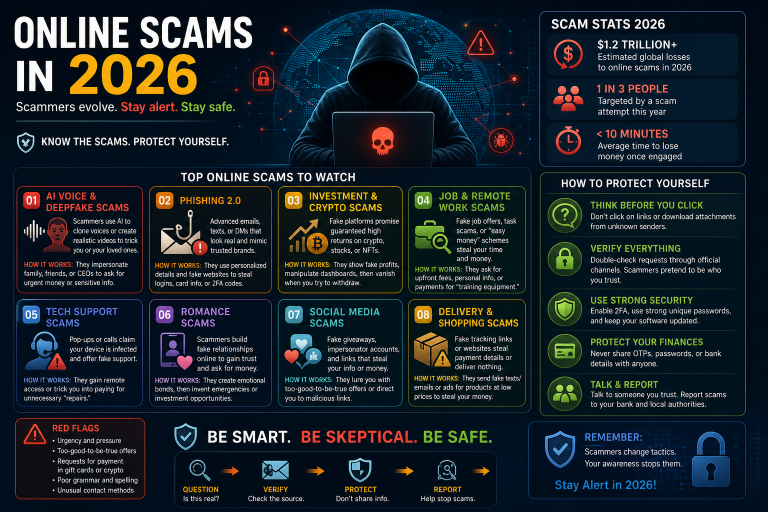
The Four Phishing Types You’ll Actually Encounter in India Right Now
The threat landscape isn’t generic. In India specifically, certain attack types are more common than others, and knowing which ones are active right now matters more than memorising a theoretical taxonomy.
1. UPI and Banking Impersonation
By far the most common type targeting Indian users. Attackers pose as HDFC, SBI, Paytm, or PhonePe and create urgency around account suspension, KYC expiry, or a “suspicious transaction”. The fake login pages are often indistinguishable from the real ones — same fonts, same layout, same colour scheme. The only reliable tell is the URL, which will be off by a character or use a .info or .xyz domain instead of .in.
2. Job Offer Scams via WhatsApp
These have exploded over the past two years. You receive a WhatsApp message from an unknown number offering freelance work — typically data entry, product reviews, or social media tasks that pay per task completed. They’re real for the first few rounds. Then they ask you to invest a small amount to “unlock” a bigger payout. That money disappears, and so does the contact. The CERT-In advisory from late 2024 flagged this as one of the top consumer cyber threats in the country.
3. Fake Government Portal Emails
These impersonate the Income Tax Department, EPFO, or Aadhaar services. They usually arrive around tax season or just after a real government announcement — the timing isn’t coincidence, it’s deliberate. The emails ask you to verify your PAN, update your Aadhaar linkage, or download a “mandatory compliance document” that is, of course, malware.
4. SMS OTP Bypass Attacks
This one is more sophisticated. You get a call from someone claiming to be from your bank or telecom provider. They say they need to “confirm your identity” and ask you to read back an OTP that was just sent to you — which they triggered. Reading that OTP to them gives them access to your account. The social engineering here is remarkably effective because the OTP actually arriving feels like proof the caller is legitimate. It isn’t.
What to Actually Do When You Receive a Suspicious Message
Theory is fine. Practical steps are better. Here’s the exact process I follow now — and have trained my parents to follow:
- Stop and add ten seconds. Before clicking anything, pause. That’s it. Ten seconds is enough to interrupt the emotional urgency the attacker has created.
- Check the sender address fully. Not just the display name. Hover over it (on desktop) or tap to expand (on phone). “HDFC Bank noreply@hdfc-secure-alert.xyz” is not your bank.
- Go directly, never follow. If the message is about your bank account, close the email and open your bank’s app or type the URL yourself. Never use a link from the message.
- Verify via a different channel. If someone calls claiming to be from your bank, hang up and call the number on the back of your card. The caller ID can be spoofed. The number on your card cannot.
- Report it. Forward phishing emails to report@phishing.gov.in and notify your bank through official channels. It takes three minutes and helps protect others.
The Honest Truth About Passwords People Don’t Want to Hear
I know you’ve heard the password advice a hundred times. I’ll make this quick and different.
The single most dangerous password habit isn’t using a weak password. It’s reusing a decent password across multiple sites. When a website you use gets breached — and they do, constantly — attackers don’t just try that password on that site. They run it through hundreds of other services automatically. This is called credential stuffing, and it’s the most common way “secure” accounts get taken over.
The fix is a password manager. I use Bitwarden because it’s free, open-source, and works across all my devices. My wife uses it now too. Every account she has gets a different randomly generated password that she doesn’t need to remember. If one site leaks, the others are safe.
If you’re not ready for a password manager yet, at minimum: use a unique password for your email account, your banking, and your primary social media. Those three are what attackers care about most.
Two-Factor Authentication: The One Setting That Changes Everything
If you do nothing else after reading this, enable two-factor authentication (2FA) on your email and banking apps today. Not tomorrow. Today.
I want to be specific, because there’s a hierarchy here. SMS-based 2FA (the OTP sent to your phone) is better than nothing, but it has weaknesses — SIM swapping, SS7 vulnerabilities, and the OTP bypass attack I described earlier. App-based 2FA, using something like Google Authenticator or Authy, is significantly more secure because the code is generated on your device and never travels over the phone network.
For your most sensitive accounts, consider a hardware key like a YubiKey. They cost around ₹3,000–4,000 and make phishing physically impossible for those accounts, since the key has to be physically present to authenticate.
If You Think You’ve Already Been Compromised — What to Do Right Now
Time matters more than almost anything else when you’ve been phished. Speed is the difference between a close call and a financial loss.
Within the first hour, do these things in order:
- Change the password for the compromised account immediately, from a different device if possible.
- Revoke all active sessions (most apps have a “Log out of all devices” option under security settings).
- Call your bank’s fraud helpline if financial details were involved. In India: SBI is 1800-11-2211, HDFC is 1800-202-6161, most banks have 24/7 fraud lines.
- File a cybercrime complaint at cybercrime.gov.in. You’ll need the phishing URL, the sender address, and screenshots if you have them.
- Run a check on haveibeenpwned.com to see if your email has appeared in any known data breaches.
The thing I learned from my own incident is that embarrassment makes people slow. I waited almost an hour before calling my bank because I kept hoping I was overreacting. Don’t do that. Act first, be embarrassed later.
Final Thought
Cyber awareness isn’t about becoming a security expert. It’s about building a few specific habits that raise your cost as a target above what most attackers are willing to spend. Use a password manager, turn on app-based 2FA, pause before you click, and know how to respond when something goes wrong. That’s genuinely most of it.
If this helped you, share it with one person who doesn’t work in tech. They need it more than you do.