Cybersecurity in 2026: How to Protect Your Data from AI-Powered Threats
Cybersecurity in 2026 is not the same discipline it was five years ago. The threat landscape has been fundamentally reshaped by artificial intelligence — not just as a defensive tool, but as an offensive weapon that has lowered the barrier for sophisticated attacks to near zero. At the same time, the attack surface for most individuals and organisations has expanded dramatically: more devices, more cloud services, more data flowing between more systems than at any previous point in history.
This guide explains what AI-powered cyber threats actually look like in practice, what they target, and what specific defences are both available and effective for individuals and small organisations navigating this environment in 2026.
How AI Has Changed the Threat Landscape
Attacks That Previously Required Expert Skills Now Require Almost None
For most of cybersecurity’s history, sophisticated attacks required significant technical expertise. Writing functional malware, crafting convincing phishing campaigns, identifying and exploiting vulnerabilities — these were skills that took years to develop and were therefore a limiting factor on how many capable attackers existed.
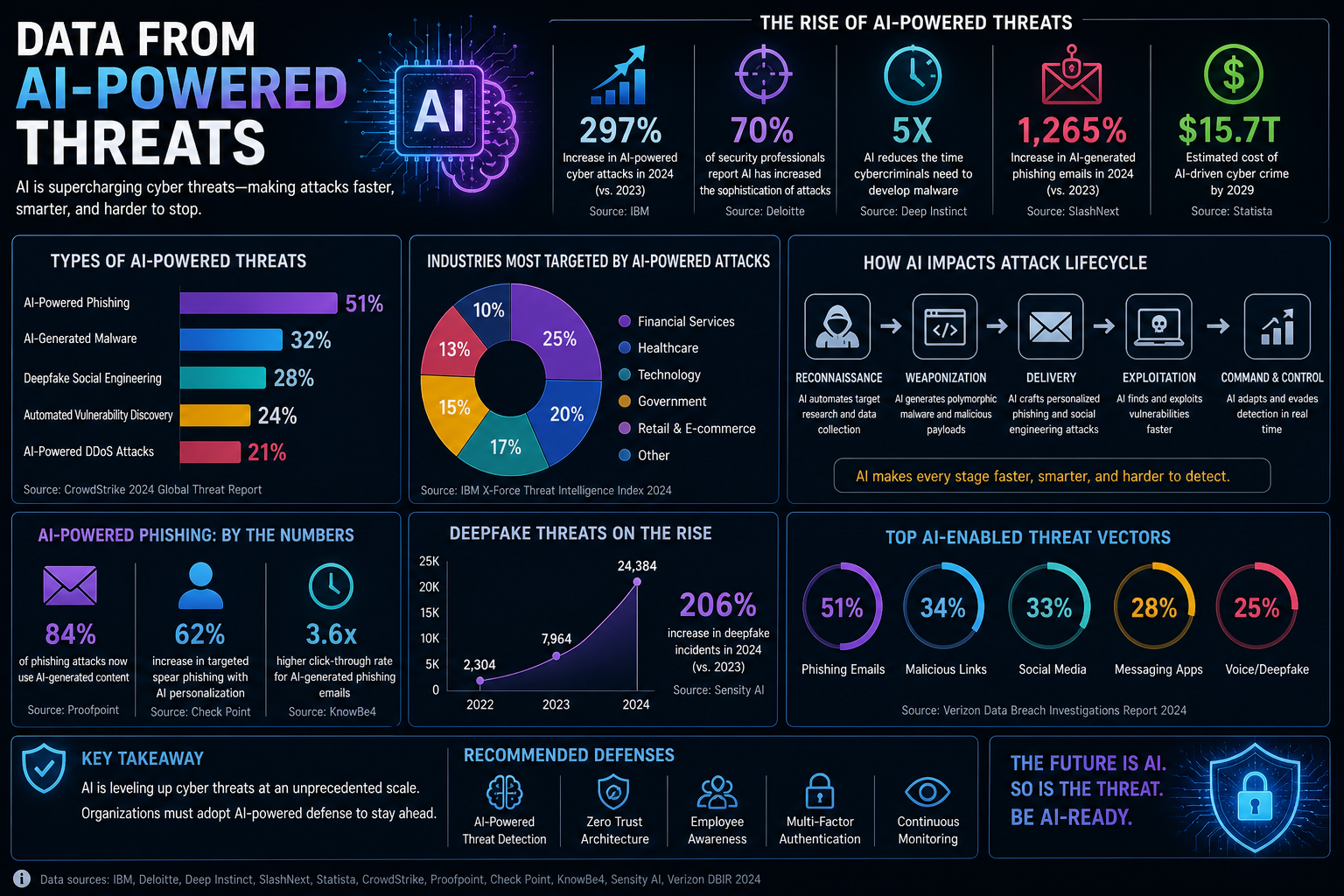
Generative AI has partially dissolved this barrier. AI tools can now write functional malicious code, generate highly convincing phishing emails personalised to specific targets, identify potential vulnerabilities in publicly accessible systems, and assist with the operational aspects of running an attack campaign. This has not eliminated the skill ceiling for the most advanced attacks, but it has lowered the floor significantly — enabling a much larger population of less-skilled actors to conduct more effective attacks than was previously possible.
AI-Powered Attacks Are Adaptive
Traditional security defences work on the principle of pattern recognition — identifying attacks because they match known signatures or behavioural patterns. AI-powered attacks can adapt in real time, modifying their approach when they encounter defensive responses. This includes varying malware code to evade signature detection, adjusting phishing message content based on what generates responses, and selecting attack pathways that show the least resistance.
The implication for defence is a shift away from purely reactive, signature-based protection toward behavioural analysis and anomaly detection — systems that identify threats not because they match a known pattern but because their behaviour deviates from established baselines.
The Primary Threats Targeting Individuals and Small Organisations in 2026
Credential Theft: Still the Most Common Initial Attack Vector
Despite advances in attack sophistication, stolen credentials remain the leading cause of unauthorised account access. Credential stuffing — using large databases of username and password combinations leaked from previous breaches to attempt access on other services — is effective because password reuse remains extremely common. If a password used on a breached service in 2020 is still being used on a banking or email account in 2026, that account is directly exposed to any attacker with access to the breach database.
The defence is straightforward but requires consistent application: unique, complex passwords for every account, managed through a password manager. The password manager removes the cognitive burden of remembering unique credentials and removes the incentive for reuse. Password managers with breach monitoring — 1Password, Bitwarden, Dashlane — alert you when credentials you use appear in known breach databases.
Phishing and Social Engineering: The Human Layer Attack
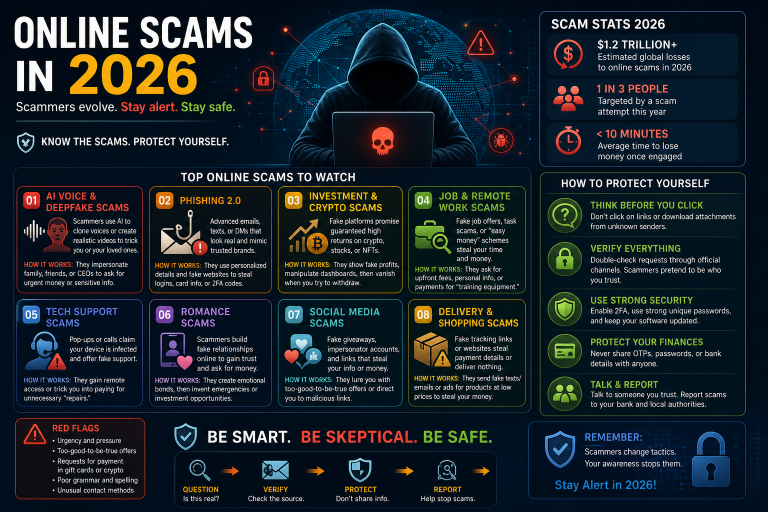
No technical defence protects against an attack that successfully convinces a legitimate user to take a harmful action voluntarily. Phishing exploits human psychology — trust, urgency, authority, fear — and remains the most common initial access method in reported breaches precisely because it bypasses technical controls by targeting people rather than systems.
AI has improved phishing effectiveness by enabling personalisation at scale. An attacker with access to your email address, your name, your employer, and some knowledge of your recent activity can generate a message that references specific details of your life, uses the correct tone and format for the organisation it purports to be from, and creates a plausible reason for immediate action. The quality gap between a real communication and a well-crafted phishing attempt is now very narrow.
The primary defence is verification habits: independently verify any request that involves credentials, financial action, or sensitive information, regardless of how legitimate the source appears. The secondary defence is phishing-resistant multi-factor authentication — hardware security keys or passkeys — which prevents attackers from using stolen credentials even when phishing succeeds in capturing a password.
Ransomware: Disruption as a Business Model
Ransomware — malware that encrypts a victim’s files and demands payment for the decryption key — has evolved from a relatively crude opportunistic attack into a sophisticated, organised criminal enterprise. Modern ransomware operations use a “double extortion” model: they encrypt files and also exfiltrate data before encrypting, threatening to publish sensitive information publicly if the ransom is not paid. This adds a data breach dimension to what was previously purely a disruption attack.
For individuals, ransomware typically arrives through phishing emails, malicious downloads, or vulnerabilities in unpatched software. The most effective protection is a combination of regular offline backups (which make the encryption irrelevant — you can restore from backup without paying), keeping software and operating systems updated to close known vulnerabilities, and being cautious about what you download and execute.
For small organisations, the attack surface is larger and the impact more severe. An offline, tested backup strategy is non-negotiable. Endpoint protection with behavioural ransomware detection — which identifies the file encryption behaviour characteristic of ransomware before it completes — provides an additional layer of protection.
Data Harvesting Through Malicious Applications
Mobile apps and browser extensions request permissions that give them access to contacts, location, camera, microphone, and stored files. Most people grant these permissions without considering what an application could do with that access. Malicious applications — particularly those distributed outside official app stores, but sometimes through them — harvest this data and transmit it to third parties, creating a persistent surveillance capability on your device.
The principle for limiting this exposure is minimal permissions: grant applications only the permissions they genuinely need to function, review and revoke permissions for applications that are no longer actively used, and treat any application requesting access it does not obviously need to function as suspicious. Browser extensions deserve particular scrutiny — they run on every page you visit and have access to everything your browser does, including credentials you type and sensitive data you access.
Unsecured Network Exploitation
Public Wi-Fi networks — in cafés, airports, hotels, and public spaces — are shared, often unencrypted, and in some cases operated by attackers specifically to intercept traffic. A man-in-the-middle attack on a public network allows an attacker to intercept and potentially modify communications between your device and the internet, capturing credentials, session tokens, and sensitive data.
The protection is a VPN (Virtual Private Network) that encrypts your device’s traffic before it leaves your device, making intercepted data unreadable. Not all VPNs are equal — free VPN services often monetise user data, which is precisely what you are trying to protect. Reputable paid VPN services include Mullvad, ProtonVPN, and ExpressVPN. For general browsing on trusted networks, HTTPS provides meaningful protection; for sensitive activities on any network you do not control, a VPN is the appropriate standard.
Building Your Personal Cybersecurity Framework
Individual cybersecurity is not about implementing enterprise-grade tools at home. It is about applying a small number of high-impact practices consistently, which together significantly reduce your exposure to the most common attacks.
The Foundation: Identity and Authentication Security
Your email account is the master key to your digital life — it can be used to reset the password on virtually every other account. Securing it is the highest-priority action in personal cybersecurity. This means a strong unique password (managed in a password manager), phishing-resistant two-factor authentication (a hardware security key like a YubiKey, or at minimum an authentication app rather than SMS), and a recovery email address that is itself equally secured.
The same security standard should be applied to financial accounts, cloud storage, and any account containing sensitive personal information. The password manager makes managing unique credentials across dozens of accounts practical rather than burdensome.
Software Updates: The Unglamorous but Critical Practice
The majority of successful malware and ransomware attacks exploit known vulnerabilities in software — vulnerabilities for which patches already exist at the time of attack. A device running current software is protected from the majority of known exploits. A device running outdated software is not.
Enabling automatic updates for your operating system, browser, and applications removes the friction from this practice. The inconvenience of a restart to apply an update is trivially small compared to the consequence of a successful ransomware attack or credential theft.
Network Security at Home
Your home router is the gateway for all traffic between your devices and the internet. A router running default credentials (admin/admin or admin/password) is trivially compromised. Change the default login credentials immediately, use WPA3 encryption if your router supports it (WPA2 is acceptable; WEP is not), keep the router firmware updated, and consider whether guest network isolation — separating IoT devices from computers containing sensitive data — is worth implementing on your home network.
Backup Strategy: Your Recovery Safety Net
No security measure is perfect. A backup strategy that would allow you to recover from a ransomware attack, a device failure, or an account compromise is the safety net that makes all other security measures less critical to be perfect. The standard recommendation is the 3-2-1 backup rule: three copies of important data, on two different types of media, with one copy stored off-site or offline. For most individuals, this means a combination of an external hard drive and a cloud backup service — with the cloud backup providing the off-site component.
Recognising When You Have Been Compromised
Early detection of a security incident limits damage. Several indicators suggest your accounts or devices may have been compromised: login notifications for accounts you did not access, unfamiliar devices appearing in account security settings, emails or messages sent from your accounts that you did not write, unexpected password reset emails for accounts you did not initiate, unusual financial transactions, and device behaviour anomalies — excessive battery drain, unexpected data usage, or applications running that you did not open.
If you suspect compromise, the priority actions are: change passwords for affected accounts starting with email, revoke access for any unrecognised connected applications, check account activity logs for unauthorised actions, contact your financial institution if there is any financial exposure, and run a reputable malware scan on affected devices.
The Mindset That Makes Security Practices Sustainable
Cybersecurity fatigue — the state of being overwhelmed by security requirements to the point of abandoning them — is a real and common phenomenon. The practical solution is not to implement everything simultaneously but to build the foundation first (password manager, two-factor authentication, software updates, basic backups) and expand from there as each practice becomes habitual.
Security is not a state you achieve; it is a practice you maintain. The goal is not perfect security, which does not exist, but a level of security that makes you a more difficult target than most, consistently applied over time.
This article is for informational and educational purposes. Cybersecurity threats evolve continuously. For professional security assessment or incident response, consult a qualified cybersecurity professional.